Free CSV & Spreadsheet to Bulk Image Generator (Up to 100 Rows)

MarkdownPicRestoring…
369 chars

Good ideas deserve a clear picture.

Turn notes, explanations, and useful discoveries into an image worth sharing.

Start with your words. The canvas takes care of the rest.

Make it yours

  1. Paste Markdown or open a file.
  2. Choose a size, a theme, and a typeface.
  3. Export a crisp PNG — ready to post.

Your work stays in this browser. No account needed.
Ready to export
Auto height · 1200 × 1240
100%

Free · Up to 100 images/ZIP · Google Sheets & CSV · Zero upload

Free CSV & Spreadsheet to Bulk Image Generator (Up to 100 Rows)

Automate repetitive visual production without paying for Canva Pro or writing Puppeteer scripts. Design one Markdown card with {{column}} placeholders, open Batch, paste rows from Google Sheets or upload a CSV, and download up to 100 consistent, branded PNG/JPEG/WebP images in a single ZIP — 100% locally in your browser.

Start in the editor

Starter templates

Open the CSV batch card or any template below, add {{column}} placeholders, and generate up to 100 matching visuals in one ZIP.

How it works

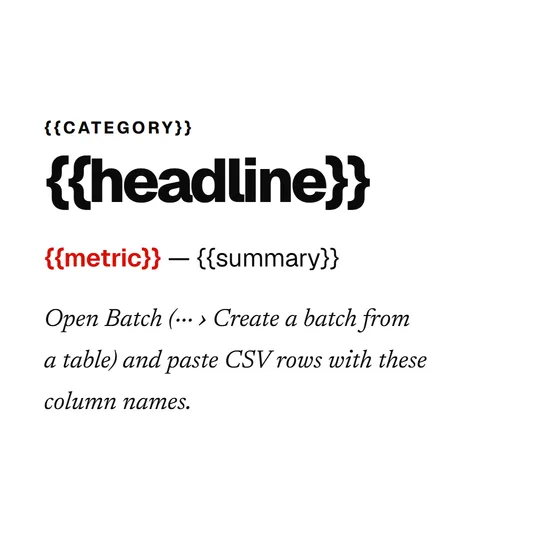
  1. Design your master card with {{placeholders}}. Write a reusable layout using double-brace placeholders like {{headline}}, {{metric}} and {{summary}} that match your spreadsheet column headers.
  2. Open Batch and paste rows or load a CSV. Open the ··· menu › Create a batch from a table (or click Batch), paste directly from Excel/Google Sheets or pick a .csv file (up to 100 rows).
  3. Export all images at once as one ZIP. MarkdownPic renders every row with your chosen theme, canvas size and Brand Kit signature, then downloads one clean ZIP containing every numbered image.

Why use MarkdownPic

Frequently asked questions

How many images can I generate in a single CSV batch?

You can generate up to 100 images per batch in a single ZIP download. For larger catalogs, simply run consecutive 100-row chunks.

How do placeholders map to my CSV or spreadsheet columns?

The first row of your CSV or pasted table defines column names. Wrap any column name in double curly braces — such as {{title}} or {{price}} — inside your Markdown template.

Can I batch-generate 1280 × 720 YouTube thumbnails or 1080 × 1350 social cards?

Yes. Pick any canvas preset (Square, Portrait, Story, Wide 16:9 or Landscape 1200 × 630) before running Batch; every image in the ZIP exports at that exact resolution.

Does MarkdownPic upload my CSV file or spreadsheet data?

No. CSV parsing, placeholder substitution, image rendering and ZIP packaging all run 100% inside your local browser.

What formats can I export from Batch?

You can batch-export PNG, JPEG or WebP at 1×, 2× or 3× resolution, all bundled neatly into one ZIP archive.

Related guides, templates and tools